vMix Pricing & Plans 2026 – Which License Is Actually Right for You?

Why Professionals Choose vMix

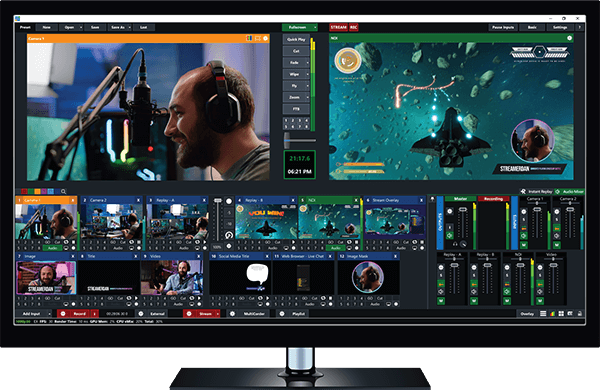
vMix is not just a streaming tool. It’s a full software-based vision mixer — replacing hardware that costs five to ten times more. Before comparing prices, it helps to understand what separates it from free alternatives like OBS Studio.

Low Latency Processing
Millisecond-level switching — critical for live sports, interviews, and real-time events.
NDI & SRT Support
Broadcast-quality video over standard networks. No capture card required.
Multi-Destination Streaming
Go live on YouTube, Facebook, and Twitch simultaneously from one machine.
Instant Replay
Single-channel on HD, dual-channel on Pro. Essential for sports production.
Virtual Camera Output
Send your entire vMix production directly into Zoom, Teams, or Skype.
One-Time License
Pay once, own it forever. No subscription. Upgrades are optional.

All Four Plans at a Glance

Every vMix license is a one-time perpetual purchase. No monthly fees unless you add optional extras.

Edition Price Max Resolution Live Streaming Best For
Basic $60 720p No Recording only
4K $700 4K (2160p) Yes Agencies, large displays
Pro $1,200 4K Yes Sports broadcast, events
Key facts before you buy: Updates within the same major version (e.g. v27.0 → v27.5) are free. Upgrading to a new major version costs roughly 50% of the license price — but is always optional. One license installs on two machines; one active at a time.

Honest Review of Every Plan

vMix Basic
For simple recording — nothing more
$60
One-time · Perpetual

Basic is the most misunderstood edition. It’s not for streamers. It’s specifically for people who only need to record — and that’s it.

What’s included
  • 4 external inputs
  • 720p recording to MP4 or AVI
  • Basic transitions and overlays
What’s missing
  • Live streaming of any kind
  • NDI or SRT support
  • Instant replay
Who should buy it: Educators recording lectures, trainers making tutorials, anyone who only needs single-camera recording. If there’s even a small chance you’ll want to stream later, start with HD instead — you’ll save money on the upgrade.

vMix 4K
For ultra HD output and ISO recording
$700
One-time · Perpetual

A meaningful upgrade over HD — but only if your production actually requires it. Most viewers on mobile devices won’t see a difference over 1080p.

What 4K adds over HD
  • True 4K output (3840×2160 at up to 60fps)
  • Multi-record — up to 4 separate files simultaneously (ISO recording)
  • Advanced color correction (lift, gamma, gain controls)
  • GPU-accelerated effects for smoother real-time animations
Trade-offs to know
  • 4K streaming requires 20–35 Mbps upload — most venues can’t guarantee that
  • Requires a powerful GPU; NVIDIA RTX 3060 minimum for smooth encoding
Who needs it: Video agencies delivering 4K content, production companies with large LED wall displays, broadcasters with ISO recording requirements.

vMix Pro
Maximum control — for sports and broadcast
$1,200
One-time · Perpetual

Pro is built for a specific use case: live sports and large multi-camera broadcasts. If that’s not you, you’re paying for features you’ll never touch.

What Pro adds over 4K
  • Two independent instant replay channels simultaneously
  • Up to 8 hardware capture devices (vs. 4 on HD and 4K)
  • External rendering to separate monitors or projectors
  • Hardware tally light support
  • Variable speed slow motion replay
Honest take: Pro is overkill for the vast majority of buyers. The $500 jump from 4K is only justified if you need two-channel replay or more than 4 cameras. Don’t buy it as a “just in case.”

What the License Price Doesn’t Include

The license is only part of your total spend. Budget for these before you commit.

vMix Social
$125/yr
Optional add-on. Moderates YouTube, Facebook, and Twitch comments in one dashboard. Run live polls, display chat on screen. Worth it for interactive productions.
Major Version Upgrade
~50% off
When a new major version releases, you pay roughly half your original license price. Your old version keeps working indefinitely — upgrading is optional.
Capture Cards
$100–$500
Required for physical cameras unless using NDI. Blackmagic DeckLink ($150–$500), Magewell USB ($250–$400), or Elgato Cam Link ($100–$150).
Edition Upgrades
Pay diff. only
Start lower, upgrade later — you pay only the difference. Basic → HD is ~$290. HD → 4K is ~$350. No need to repurchase a full license.

vMix vs. Free Alternatives

OBS is genuinely excellent for simple streams. Here’s where each tool fits.

Software Price Streaming Replay NDI Learning Curve
OBS Studio Free Plugin only Limited Moderate
vMix Basic $60 Easy
vMix HD $350 Basic Moderate
Wirecast $599/yr Steep
Hardware Switcher $5,000+ Steep

Which Plan Should You Buy?

Three questions. That’s all it takes to find your right edition.
1
Do you need live streaming?
No vMix Basic · $60
Yes Continue to question 2
2
Do you require 4K output?
No vMix HD · $350 ← right for most people
Yes Continue to question 3
3
Do you need dual replay channels or more than 4 cameras?
No vMix 4K · $700
Yes vMix Pro · $1,200
Pro tip: Download the free 60-day trial of vMix Pro before buying anything. It includes a watermark but gives you full access to every feature. Test your actual production setup — real cameras, real sources — then buy exactly what you use. You can always upgrade later.Live Video Streaming Software | vMix

Common Questions, Straight Answers

Is vMix a one-time payment or subscription?
One-time perpetual license. You pay once and own that version forever. Major version upgrades are optional and cost roughly 50% of the original price. The only recurring fee is vMix Social at $125/year — which is completely optional.
Can I install vMix on multiple computers?
Yes — two installations per license, but only one can be active at a time. Useful for a studio desktop and a laptop for on-location productions.
Does vMix work on Mac?
Officially, no. vMix supports Windows 10 and 11 only. Many users run it on Mac via Boot Camp or Parallels with Windows ARM, but this is unsupported. Native macOS support is not available in 2026.
What’s the real difference between HD and 4K?
Resolution (1080p vs 4K), multi-record capability (1 file vs 4 simultaneously), and advanced color correction tools. Both editions support live streaming, NDI, and SRT. Unless you have a specific 4K delivery requirement, HD will serve you better.
Can I upgrade from a lower edition later?
Absolutely. You only pay the difference between editions. Basic → Pro costs approximately $1,140. Upgrades are processed instantly through your vMix account — no repurchase needed.
Can I stream to multiple platforms at once?
Yes. HD, 4K, and Pro support up to 3 simultaneous RTMP destinations. Stream to YouTube, Facebook, and Twitch at the same time without any additional software.
Are there educational or non-profit discounts?
Yes — typically 15% to 30% off. Contact vMix sales directly with proof of status. Discounts are not applied automatically at checkout.
What hardware do I need?
Minimum: Windows 10/11 (64-bit), Intel Core i5 or Ryzen 5, 8GB RAM, NVIDIA GTX 1060. Recommended for 4K or Pro: Intel i7 or Ryzen 7, 16GB RAM, NVIDIA RTX 3060 or higher, 500GB SSD.

Bottom Line — Buy This Edition

Recording only
Basic
$60
Most streamers, churches, eSports, webinars
HD ← Start here
$350
Agencies, ISO recording, 4K deliverables
4K
$700
Sports broadcast, 5+ cameras, dual replay
Pro
$1,200

For most buyers, vMix HD is the answer — 1080p streaming, unlimited inputs, NDI, SRT, and basic replay for a one-time payment that costs less than two months of a Wirecast subscription.

Start with the 60-day Pro trial. Test your real workflow. Buy exactly what you use.

Ready to Start Your Free Trial?

The 60-day Pro trial is fully functional — the only limitation is a watermark on the output. No credit card required.


Last reviewed May 2026 · Based on publicly available vMix licensing information · Prices in USD


Leave a Comment